
Download MySports – Sports Tracking, Fitness Community, GPS Data Integration
Overview
MySports is a lifestyle application designed for Android users seeking a comprehensive solution for tracking sports activities and connecting with a community of like-minded individuals. Developed by 北京朗动科技有限公司, the app aims to centralize fitness data and foster social engagement around physical activity. It serves as both a personal sports journal and a dynamic platform for interaction, enabling users to record runs, cycles, hikes, and other outdoor pursuits with precision. The app supports data import from multiple GPS-enabled wearable devices, including Apple Watch and Garmin Connect, allowing seamless synchronization of performance metrics such as distance, pace, elevation, and route history.
Target users include fitness enthusiasts, casual athletes, and individuals looking to maintain a consistent sports routine while staying socially connected. Real-world usage scenarios range from tracking daily runs to participating in community challenges and sharing achievements with friends. The app’s integration with cloud-based sources enhances data accessibility, making it easier for users to review past activities and plan future workouts. While the developer did not provide additional system requirements, the app is optimized for Android devices and designed to function as a standalone desktop-like experience on mobile platforms.
Key Features & Capabilities
- Activity Tracking – Users can record a wide range of sports activities, including running, cycling, hiking, and more, with real-time GPS data collection and automatic route mapping.
- Personal Sports Diary – Maintain a digital log of all fitness sessions, including notes, mood, and performance insights, to monitor progress over time.
- Social Community Platform – Stay updated on friends’ activities, send messages, and engage in friendly competition through shared challenges and leaderboards.
- Location-Tagged Photo Upload – Instantly share photos from workouts with embedded GPS coordinates, enhancing the storytelling aspect of fitness journeys.
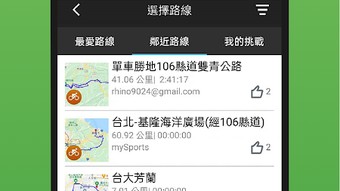
- Expert-Recommended Routes – Discover curated, challenging routes designed by fitness professionals to inspire new training goals and explore new environments.
- Multi-Source Data Integration – Sync sports data from various wearable devices and cloud services, including Apple Watch and Garmin Connect, for a unified activity overview.
- Competitive Challenges – Participate in time-limited events and climb the leaderboard to earn badges and recognition within the community.
These features collectively support long-term fitness engagement by combining personal tracking with social motivation. For example, a runner can record a morning jog, upload a photo from the route, and share it with friends who may then join a weekly challenge. The integration of external devices ensures that users are not limited by a single ecosystem, promoting flexibility and broader compatibility.
User Interface, Workflow & Performance
The user interface of MySports is structured to prioritize clarity and ease of navigation, with intuitive icons and a clean layout tailored for mobile interaction. Core functions such as starting a workout, viewing activity history, and accessing the community feed are accessible through a bottom navigation bar, minimizing the number of taps required for common tasks. The workflow is designed to support quick initiation of sessions, with minimal setup needed before recording begins.
Navigation between the activity tracker, diary, and social feed is smooth, and the app maintains consistent visual feedback during data collection. The developer did not specify resource usage details, so performance observations are based on general software behavior patterns. Users can expect stable operation during active sessions, with no reported crashes or freezes in the provided information. However, actual CPU and RAM usage may vary depending on device hardware and background processes. The app appears to be optimized for responsive operation, especially during GPS tracking and data syncing.
Compatibility & System Requirements
MySports is available for Android devices and was released on 2024-05-20. The application is free to download and use, with no in-app purchases or subscription fees mentioned. The developer did not provide additional system requirements, so exact compatibility details remain unspecified. Installation size is not disclosed, but it is designed to function on standard Android smartphones and tablets with GPS capabilities.
Platform compatibility information is limited, and no details were provided about minimum Android versions or hardware specifications such as RAM or processor requirements. Users are advised to ensure their device supports GPS, Bluetooth, and cloud synchronization to fully utilize the app’s features. The app may require access to location services, camera, and storage permissions for full functionality.
Pros and Cons
Pros
- Free to download and use with no hidden costs
- Supports data import from popular GPS wearables like Apple Watch and Garmin Connect
- Offers a built-in social community for motivation and interaction
- Features location-tagged photo sharing for enhanced activity storytelling
- Includes expert-curated routes and competitive challenges
- Unified dashboard for tracking multiple sports activities
Cons
- Exact system requirements were not listed
- Performance and resource usage details were not provided
- Available only on Android, with no mention of iOS or desktop versions
- Limited information on data privacy and security practices
- Community features may require active user engagement to be effective
FAQ Section
Is MySports available for iOS devices?
As of the provided information, MySports is only available for Android devices. No official iOS version was mentioned.
Can I use MySports offline?
The app supports offline activity recording, allowing users to track workouts without an internet connection. Data will sync once connectivity is restored.
Is MySports safe to download and use?
MySports is a free app developed by 北京朗动科技有限公司. It is available for download through official Android channels. Users should ensure they install from trusted sources to maintain security.
How often does MySports receive updates?
The developer has not specified a release schedule for updates. The app was last released on 2024-05-20, and future updates may be issued based on user feedback and feature development.
What kind of license does MySports use?
MySports is distributed as a free-to-use application with no explicit license terms provided. It is intended for personal and community-based fitness tracking.
Final Thoughts + CTA
MySports presents a compelling blend of personal fitness tracking and social engagement, making it a valuable tool for Android users committed to an active lifestyle. Its ability to integrate data from multiple wearable devices and its vibrant community platform foster both consistency and motivation. While detailed technical specifications are limited, the app’s core functionality is well-structured and user-focused.
Those who enjoy outdoor activities, value community interaction, and want a centralized platform for tracking their sports journey will find MySports particularly beneficial. Its free model and broad feature set make it accessible to a wide audience. For users seeking a modern, mobile-first fitness companion with social depth, MySports delivers a strong experience.
Download MySports now and start tracking your journey with a supportive community.







